Best Microphones for Dictation in 2026: 8 Picks by Budget
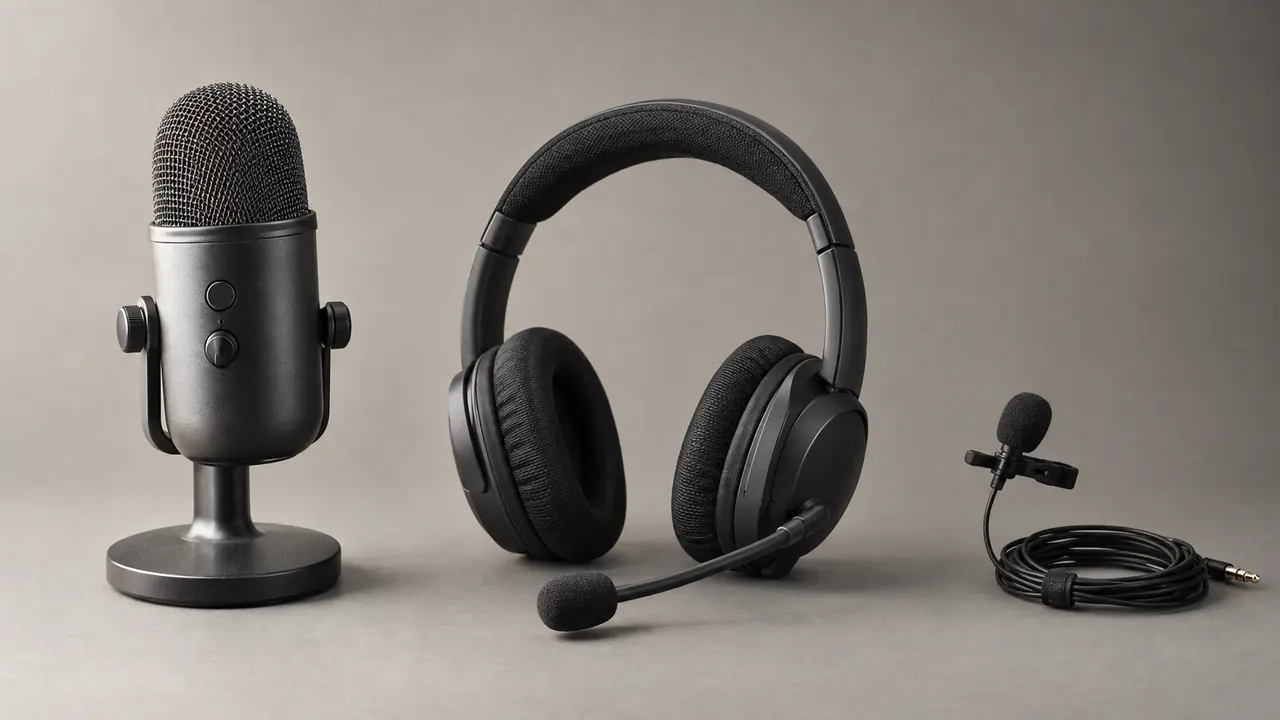
The best mic for dictation is one that stays close to your mouth and ignores the rest of the room: a USB desk mic such as the Rode NT-USB Mini for a quiet office, or a noise-cancelling headset such as the Jabra Evolve2 75 for an open-plan space. Either one gives your dictation software a far cleaner signal than a laptop's built-in microphone.
Your microphone is the single most important factor in voice dictation accuracy. Even the best transcription software cannot compensate for poor audio quality. This selection of USB desktop mics, headsets and lavalier mics is based on manufacturers' specifications, what dictation requires and user feedback, to help you choose for your budget and work environment.
Why Your Microphone Matters
Voice dictation software like Ondula uses a state-of-the-art speech recognition model to convert your speech to text. The model is highly capable, but it can only work with the audio signal it receives. A low-quality mic introduces background noise, distortion, and frequency loss that directly degrade transcription accuracy.
With a good microphone, you can reach professional-grade accuracy. With a built-in laptop mic, accuracy often drops noticeably — meaning many more words to correct. Over a full working day, the difference is massive.
What Hardware Is Best for Voice Dictation?
Three criteria matter more than the brand:
- Distance: a mic 15-20 cm (about 6-8 inches) from your mouth, such as a headset boom, a desk mic on an arm or a clip-on lavalier, picks up your voice louder than the room.
- Connection: prefer USB or a wired headset. Most Bluetooth headsets switch to a lower-quality hands-free mode as soon as their microphone is in use, which costs accuracy.
- Pickup pattern: a cardioid (directional) mic, or a headset with noise cancellation, rejects keyboard clatter and nearby voices.
Dedicated dictation microphones, such as Philips SpeechMike models, are built for professional dictation workflows in medicine or law. To dictate into everyday Windows apps, a good USB mic or headset from the picks below is enough.
USB Desktop Microphones: Best Quality for Fixed Setups
USB microphones are the ideal choice if you primarily work at a desk. They deliver superior audio quality without requiring an external audio interface.
Blue Yeti (around €100 / $110)
Now sold by Logitech G simply as the Yeti, the Blue Yeti remains a benchmark in 2026. Its cardioid mode captures your voice while effectively rejecting noise from the sides and rear. Audio quality is excellent for dictation, with clear reproduction of consonants and sibilants — two critical elements for speech recognition.
Pros: excellent audio quality, multiple polar patterns, solid build, plug-and-play. Cons: bulky, picks up desk vibrations without a boom arm. Verdict: the safe choice for a quiet home office.
HyperX QuadCast S (around €130 / $120)
Originally designed for streamers, the HyperX QuadCast S also excels at voice dictation. Its built-in pop filter and shock mount reduce unwanted noise without additional accessories. The tap-to-mute button on top is convenient for quickly silencing the mic between dictation sessions.
Pros: built-in pop filter, shock mount, accessible mute button. Cons: high price, unnecessary RGB lighting for professional use. Verdict: excellent if you want a ready-to-use mic with no extra accessories needed.
Rode NT-USB Mini (around €80 / $90)
More compact and affordable than its competitors, the Rode NT-USB Mini delivers studio-quality sound in a discreet form factor. Its cardioid pattern isolates your voice well from ambient noise. This is our top pick for pure voice dictation.
Pros: compact, excellent sound, reasonable price, detachable magnetic desk stand, 3.5 mm headphone output for zero-latency monitoring. Cons: a single pickup pattern (cardioid). Verdict: the best balance of quality, price, and size for dictation.
Headsets: Mobility and Noise Isolation
If you work in an open-plan office, travel frequently, or join video calls, a headset with a built-in mic offers a double advantage: it isolates your hearing and captures your voice up close, reducing the impact of background noise.
Jabra Evolve2 75 (around €250 / $340)
Designed for professionals, the Jabra Evolve2 75 meets Microsoft's open office requirements. Its eight microphones with active noise suppression eliminate background noise remarkably well.
Pros: exceptional noise suppression, long-wearing comfort, Bluetooth + USB dongle. Cons: high price, mic quality lower than a dedicated USB mic in quiet environments. Verdict: the best choice for noisy environments and mobile workers.
Logitech Zone Vibe 125 (around €120 / $130)
A more affordable alternative, the Logitech Zone Vibe 125 offers a good microphone with noise reduction at a contained price. Comfort is adequate for sessions of a few hours. Voice capture quality is sufficient for accurate dictation in a standard office.
Pros: affordable price, lightweight, flip-to-mute mic boom that tucks away. Cons: passive noise isolation only, average battery life. Verdict: good value for standard office use.
EPOS ADAPT 560 II (around €180 / $285)
The EPOS ADAPT 560 II replaces the Adapt 560. Its foldable boom arm and two voice microphones optimise voice pickup, for speech intelligibility the manufacturer describes as excellent, and its active noise cancellation reduces background noise to help you focus. A new headband and softer ear pads are designed for long wear.
Pros: foldable boom mic, comfortable for long wear, active noise cancellation, multipoint Bluetooth with a USB dongle, up to 46 hours of battery life. Cons: high price, pads that rest on the ears rather than around them (on-ear design). Verdict: excellent compromise between mic quality and mobility.
Lavalier Microphones: Discreet and Hands-Free
Lavalier (clip-on) microphones are perfect for dictating hands-free without cluttering your desk. Their proximity to your mouth compensates for their small size.
Rode Lavalier II (around €70 / $100)
The Rode Lavalier II is a professional lavalier mic that connects via USB-C with an adapter. Its omnidirectional capsule captures voice with surprising clarity for its size. Ideal for dictating while moving around a room.
Pros: professional sound, discreet, kevlar-reinforced cable. Cons: requires a USB-C adapter, picks up ambient noise in loud environments. Verdict: the best lavalier for home or quiet office dictation.
BOYA BY-M1 Pro (around €25 / $28)
For those who want to try voice dictation without a significant investment, the BOYA BY-M1 Pro is an excellent entry point. This wired lavalier plugs into your computer's 3.5 mm jack, not a USB port. Sound quality is adequate for dictation, provided you work in a reasonably quiet environment.
Pros: unbeatable price, compatible with almost everything, lightweight. Cons: noticeable background noise, thin and fragile cable. Verdict: perfect for beginners or as a backup mic on the go.
Our Recommendations by Budget
Tight Budget (under €30 / $30)
The BOYA BY-M1 Pro at around €25 is the best choice. Paired with software like Ondula (€3.90/month excluding tax for the Cloud plan with 50 hours of dictation), you get a functional dictation setup for under €30. Start with Ondula's free tier (10 minutes every week, for life) to test before committing.
Mid-Range Budget (€50-100 / $55-110)
The Rode NT-USB Mini (€80) for a fixed desk. It delivers audio quality more than sufficient for high-accuracy transcription.
Premium Budget (€100+ / $110+)
The Blue Yeti (€100) or HyperX QuadCast S (€130) for a fixed desk, the Logitech Zone Vibe 125 (€120) for mobility. The Jabra Evolve2 75 (€250) if you work in noisy environments. At this price point, the mic is no longer the limiting factor — your diction and environment will make the difference.
Office, Open Plan, On the Go: Which Mic for Which Setting?
Quiet home office: a USB desktop mic (Rode NT-USB Mini or Blue Yeti) will give you the best results. Audio quality is optimal and background noise is minimal.
Open-plan office: choose a headset with active noise cancellation (Jabra Evolve2 75 or EPOS ADAPT 560 II). The close-proximity mic and noise reduction compensate for the challenging sound environment.
On the go: a lavalier mic (Rode Lavalier II) or a compact headset offers a good balance between portability and quality. For short sessions, Bluetooth earbuds with a built-in mic can suffice.
Video calls + dictation: a versatile headset like the Jabra Evolve2 75 or Logitech Zone Vibe 125 covers both needs without juggling multiple devices.
Setup Tips to Optimise Your Mic
Regardless of which mic you choose, a few simple adjustments dramatically improve results:
- Position your mic 15-20 cm from your mouth — too close and plosives cause clipping; too far and background noise dominates.
- Use cardioid mode if your mic offers it — this rejects sounds coming from behind and from the sides.
- Set the gain correctly — the signal should be strong without clipping. Aim for a level between -12 dB and -6 dB.
- Eliminate vibrations — a boom arm or shock mount prevents desk impacts from interfering with the recording.
- Remove noise sources — fan, open window, coffee machine. Each noise source reduces accuracy.
How to Test Your Microphone in Windows 11
Whether you keep your current mic or plug in a new one, check what Windows actually hears (Microsoft support):
- Open Start > Settings > System > Sound.
- Under Input, select your microphone, then the arrow to its right to open its properties.
- Under Input settings, select Start test and speak normally, then Stop test. Select Play to hear the recorded sample.
- If your voice sounds too quiet or distorted, adjust the Input volume slider and test again.
Then run the test that really counts: dictate the same paragraph with each mic in your usual dictation tool and compare how many words you have to correct.
Conclusion
Investing in a good microphone is the single most cost-effective thing you can do to improve your voice dictation experience. Even a €25 mic makes a significant difference compared to your computer's built-in microphone. Paired with software like Ondula — which transcribes your voice with a state-of-the-art speech recognition model, either locally on your PC or online through our transcription provider, in Europe (Helsinki) — you get a formidable productivity tool.
Start by trying Ondula for free with 10 minutes of dictation without signing up, then create a free account (10 minutes every week, for life) and keep your current mic. You will immediately see the improvement when you upgrade to a dedicated microphone.
Ready to try voice dictation?
Download Ondula for free and start dictating in your Windows apps.
Download Ondula